CalqFrançaisOpen Calq
Learn Calq: a building from A to Z / Part 6 Rooms and interiors
Units of flats
Draw a flat once, save it as a unit, repeat it as a block, and change every copy with one edit.
You will start a 2-bed flat from a standard type, save it as a unit and repeat it as a block of flats.
01Start from a type
Open Units in the Rooms toolset. Under Start from a type, press 2-bed: Calq draws a 2-bed flat to the Nationally Described Space Standard (2 bed 4 person, 70 m2), 8.4 x 8.4 m, with its walls, doors, windows and rooms, and selects it. Make a unit reads the selection as a flat: its rooms, its size and its faces (the corridor, the facade, the party walls).
Your own drawing works the same way: draw a flat, select all of it by dragging a box round it and choose Make unit.
02Save it as a unit
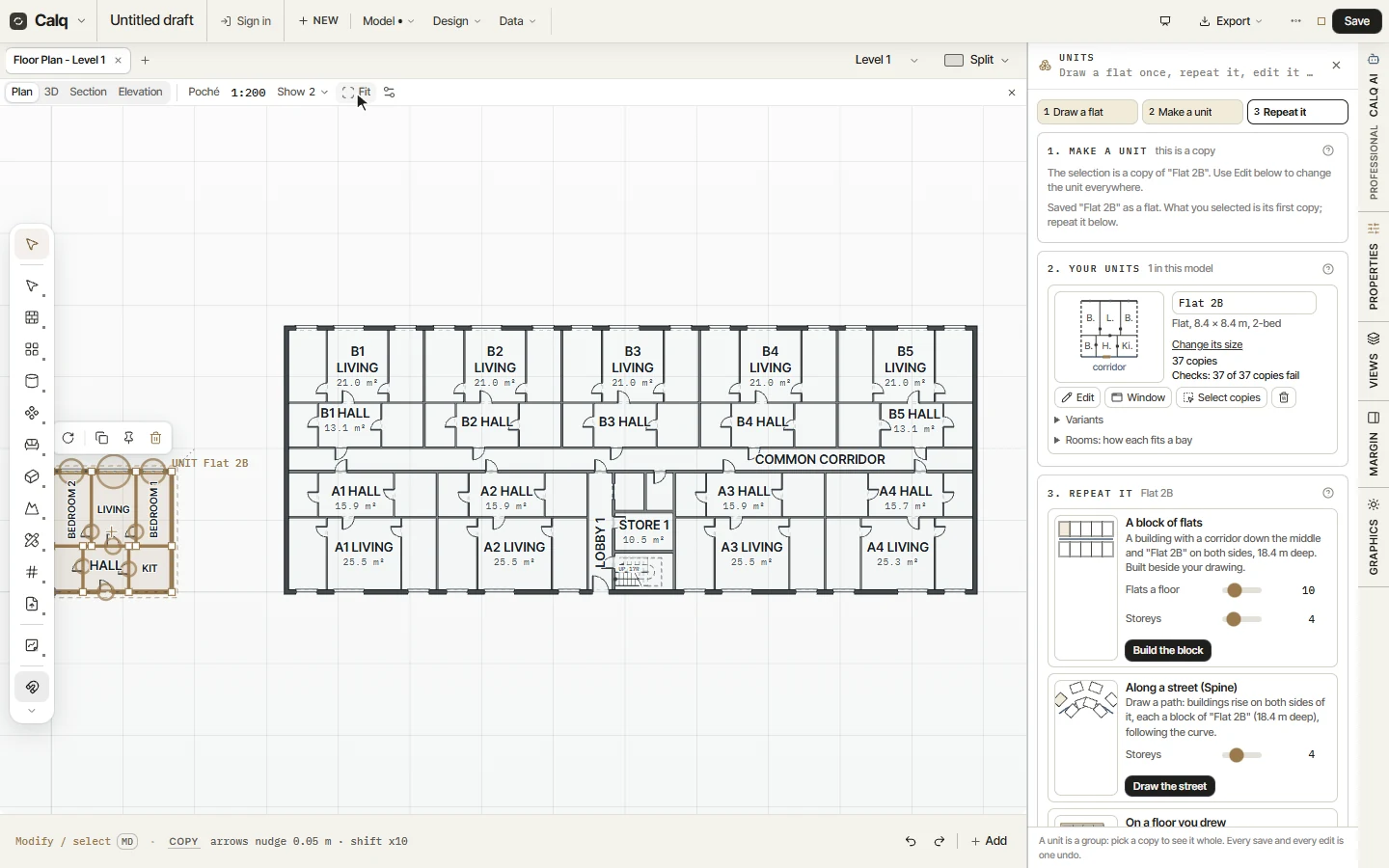
Give it a name (here Flat 2B) and press Save as a unit. The unit is listed under Your units with its plan, its size and where it is used, and what you drew becomes its first copy.
03Repeat it
Under Repeat it, choose how the unit is repeated: a block of flats (a corridor down the middle and the unit on both sides), along a street (the Spine, Part 4) or on a floor you drew (Lay out). Set the flats a floor and the storeys and press Build the block: here a block of 9 flats a floor on 4 storeys, 48 x 18.4 m, is built beside your drawing, round a common corridor with its lobby, stair and store. Every flat is a copy of the unit.
04Edit once, every copy follows
The unit's card counts its copies (37 here, the drawn flat and the 36 of the block) and checks them: here every copy fails, as the drawn flat's kitchen has no window yet. Edit opens a copy for changes and, when you save, every copy is laid again with the change; Select copies picks them all on the plan, Change its size stretches the unit to a new frontage, and Variants keeps a handed or a larger version beside it.