CalqFrançaisOpen Calq
Learn Calq: a building from A to Z / Part 2 The site
The plot
Draw the plot's boundary, read its area, give each edge its role and its setback, and see what the map can bring in round it.
You will draw the plot of the worked project, read its area in the Site drawer and say which edge is the street.
01Draw the boundary
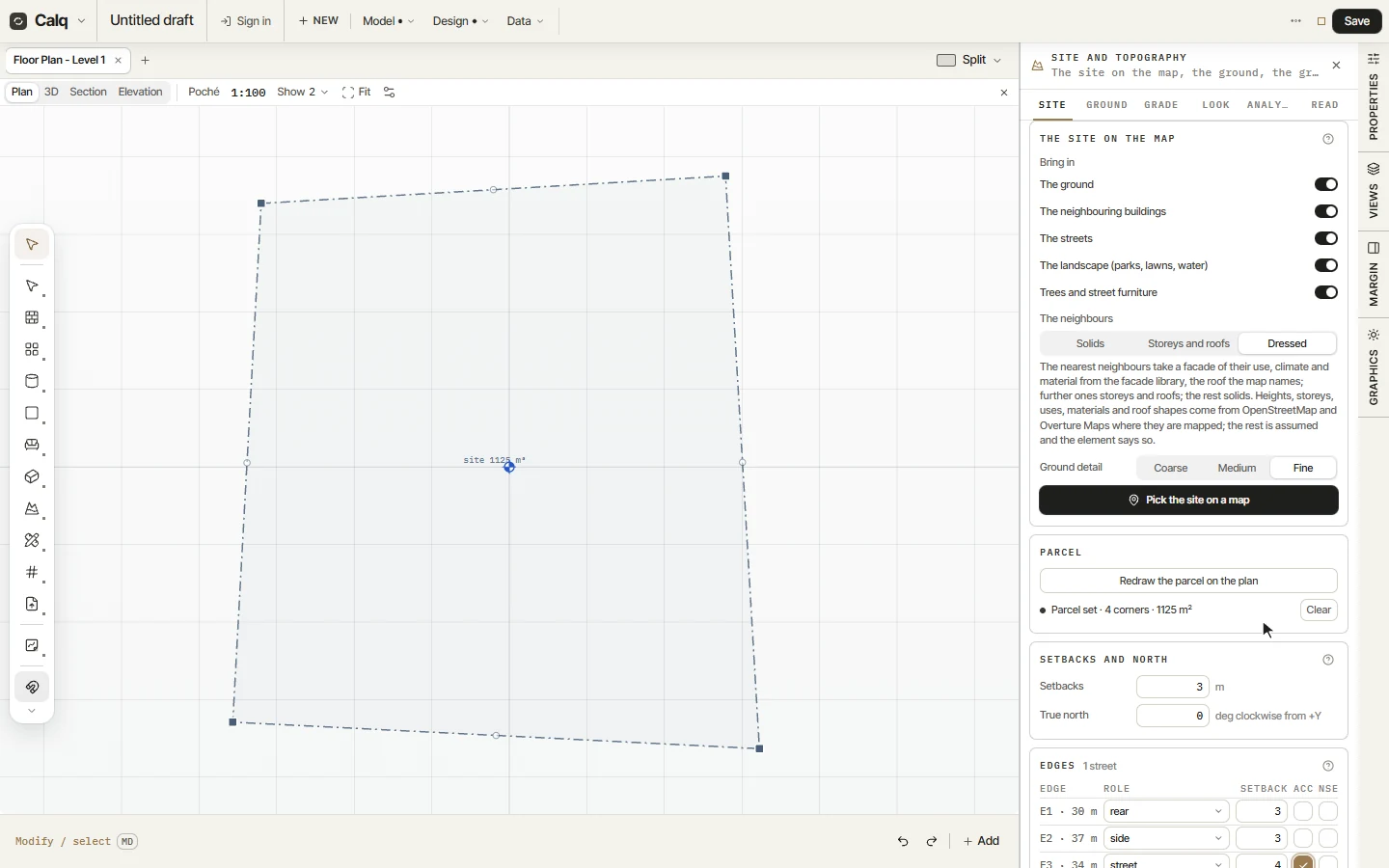
Open the Site toolset on the palette and choose Boundary, under Parcel. Click the corners of the plot on the plan one after the other, then press Enter to close it. The plot is drawn in a dash and dot line, the way a site boundary is drawn, with its area written inside.
If the plot is larger than the view, zoom out with the wheel first. A corner can be moved later by its grip, like any point of the model.
02The Site drawer
Open Topography, at the foot of the Site toolset, and its Site tab. The Parcel card says the plot is set, with its corners and its area, and lets you draw it again or clear it. Setbacks and north hold one setback for every edge, and true north, the same angle as in Part 1.
03The edges
Under Edges, Calq numbers the plot's edges E1, E2 and so on, in the order you clicked them, each with its length. Give each its role: the street, a side or the rear. The street edge is marked as the access (ACC), and an edge can be marked as noisy (NSE): a busy road, a railway.
Each edge takes its own setback. Here the south edge, E3, is the street, set back 4 m, and the north edge, E1, is the rear. The buildable area left after the setbacks is written under the Zoning card.
04The site on the map
At the head of the Site tab, The site on the map brings in what stands round a real plot: the ground, the neighbouring buildings with their storeys and roofs, the streets, the landscape, the trees and the street furniture, from OpenStreetMap and Overture Maps where they are mapped. Choose what to bring in and how the neighbours are drawn, then Pick the site on a map.
Reading the map needs a saved model: sign in and save it first. What could not be read from the map is assumed, and the element says so.