 Calq
CalqLearn Calq: a building from A to Z / Part 8 Views
A view's own graphics
Decide what one view draws and how: its categories, its filters, its detail level and its view range, without touching any other view.
On the ground floor plan, you will hide the furniture, grey the landscape, take the doors out with a filter, draw the walls at fine detail and look up at the ceiling, all in this one view.
01The view in hand
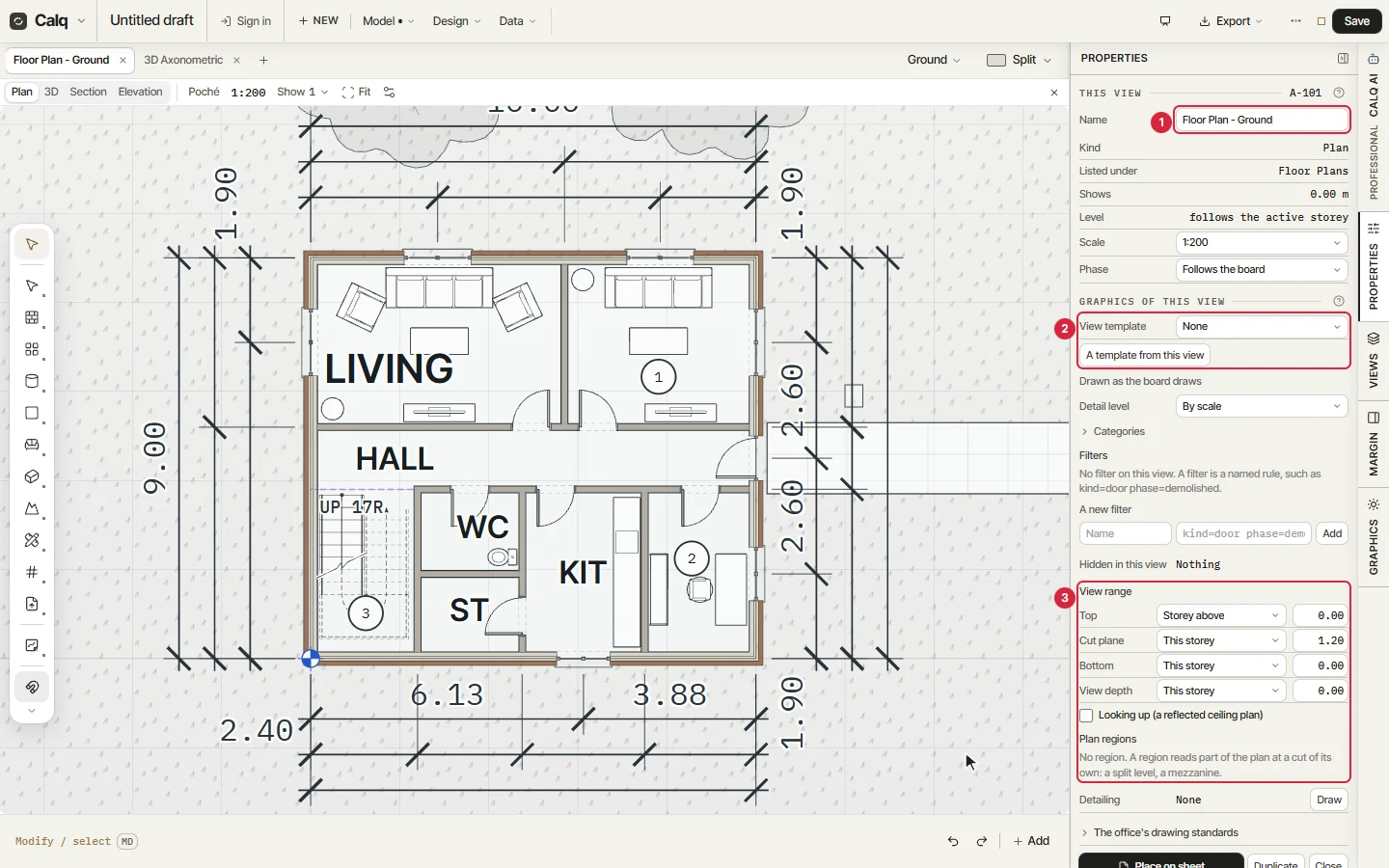
Open Properties on the right rail with nothing selected: it speaks for the view in hand. The numbers match the picture.
A demolition plan, a furniture plan and a general arrangement of one storey are three views, each with its own graphics.
- This view: its number (A-101), its name, its kind, its storey, its scale and its phase.
- Graphics of this view: a view template, the detail level, the categories, the filters and what is hidden in it.
- View range: the planes that cut the plan and how far it looks down.
02Categories
Open Categories. Each row is a category (walls, floors, doors, windows, furniture, landscape) and some have parts of their own, such as a door's swing, panel and frame. Its boxes are Shown and Halftone, then its line weight and line type.
Untick Shown for Furniture: the furniture leaves this plan, and only this plan. Tick Halftone for Landscape: the ground and the trees are drawn grey, behind the building.
03A filter
A filter is a named rule over the model. Under A new filter, type a name (Doors) and the rule kind=door, then Add: the filter counts the elements it holds, here 12. Untick its Shown box and the doors leave this view.
A rule can join several terms, such as kind=door phase=demolished. Filters apply in order, the first one wins, and the arrows move them up and down; a filter made here can be used in any other view of the model.
04Detail level and the view range
Set Detail level to Fine: the walls show their layers. By scale, the default, chooses Coarse, Medium or Fine from the view's scale.
The view range sets where the plan is cut: Top, Cut plane, Bottom and View depth, each a storey and a height above it (the cut is 1.20 m above the floor by default). Tick Looking up and the plan becomes a reflected ceiling plan, cut at 2.30 m: what is above the cut is drawn, as if seen from below.
Plan regions, under it, read part of a plan at a cut of their own, for a split level or a mezzanine.