Calq
CalqLearn Calq: a building from A to Z / Part 8 Views
3D and the section box
Turn the 3D view into a perspective, then cut it down with the section box to see inside, storey by storey.
You will switch the 3D camera, put a section box round the house, open its ground floor, step up to the next storey and cut through it with a face of the box.
01The 3D camera
Click the 3D Axonometric tab of the sample house and open the view's settings (the last button of the strip). Camera holds three: Axon (a parallel projection, the drawing a 3D of a building usually is), Persp (a true perspective) and Top. Here the view turns to Persp, then back to Axon.
The same settings hold the drawing style for every view, the Display (Realistic, Shaded and the line looks) and Ink model, which outlines the building in pen.
02Put up a section box
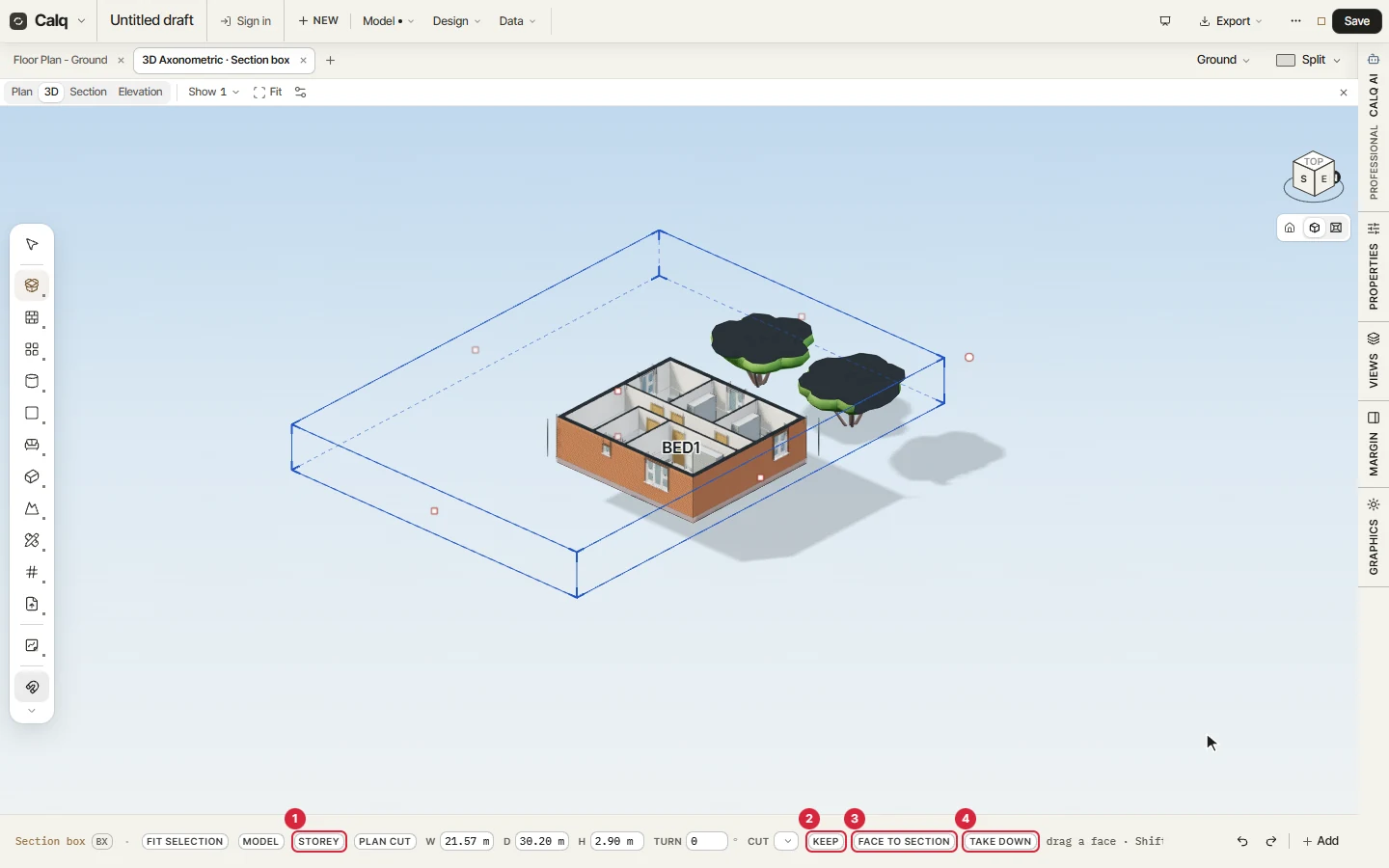
Open the Edit toolset and choose Section box (its code is BX). A box stands round the whole model, and the cursor line shows its width, depth and height. Click Storey: the box closes round the active storey with its head open, and the ground floor shows inside, its rooms and doors cut at the top of the walls.
03Step up and cut
Press Page Up: the box moves up to Level 1, and Page Down goes back. Then drag a face of the box by its grip: the cut moves with it and stops on the faces of the model, on levels and on grid lines. Here the east face slides in, and the width on the cursor line falls from 30.80 to 21.57 m.
Type a size while a face is in hand to set it exactly; Shift slides the whole box; Alt drags with no stops.
04What the box keeps
The cursor line of the box holds the rest. The numbers match the picture.
- Storey closes the box round the active storey; Plan cut, beside it, cuts that storey at plan height, a floor plan in three dimensions.
- Keep saves the box by name, to come back to it later.
- Face to section turns a side face of the box into a section view, cropped to the box and as deep as it.
- Take down removes the box and shows the whole model again.