 Calq
CalqLearn Calq: a building from A to Z / Part 12 Working together
People on a model and their roles
Invite people into one model, each in one role, and have the approver sign the brief off from a link.
You will see the roles a person can hold on a model, how an invitation reaches them, and how the approver signs the brief off without an account.
01One model, four roles
A model's owner invites people into that one model, not into a whole project, and gives each one role. The roles are the Programme's four (Part 3): the brief owner, the designer, the reviewer and the approver.
Calq checks the role on every change, whether it comes from the board, a save, a restore of the history or Calq AI: what a role may not change is kept as it was, and the person is told. Calq AI works for each person within their role.
02The role in the Programme drawer
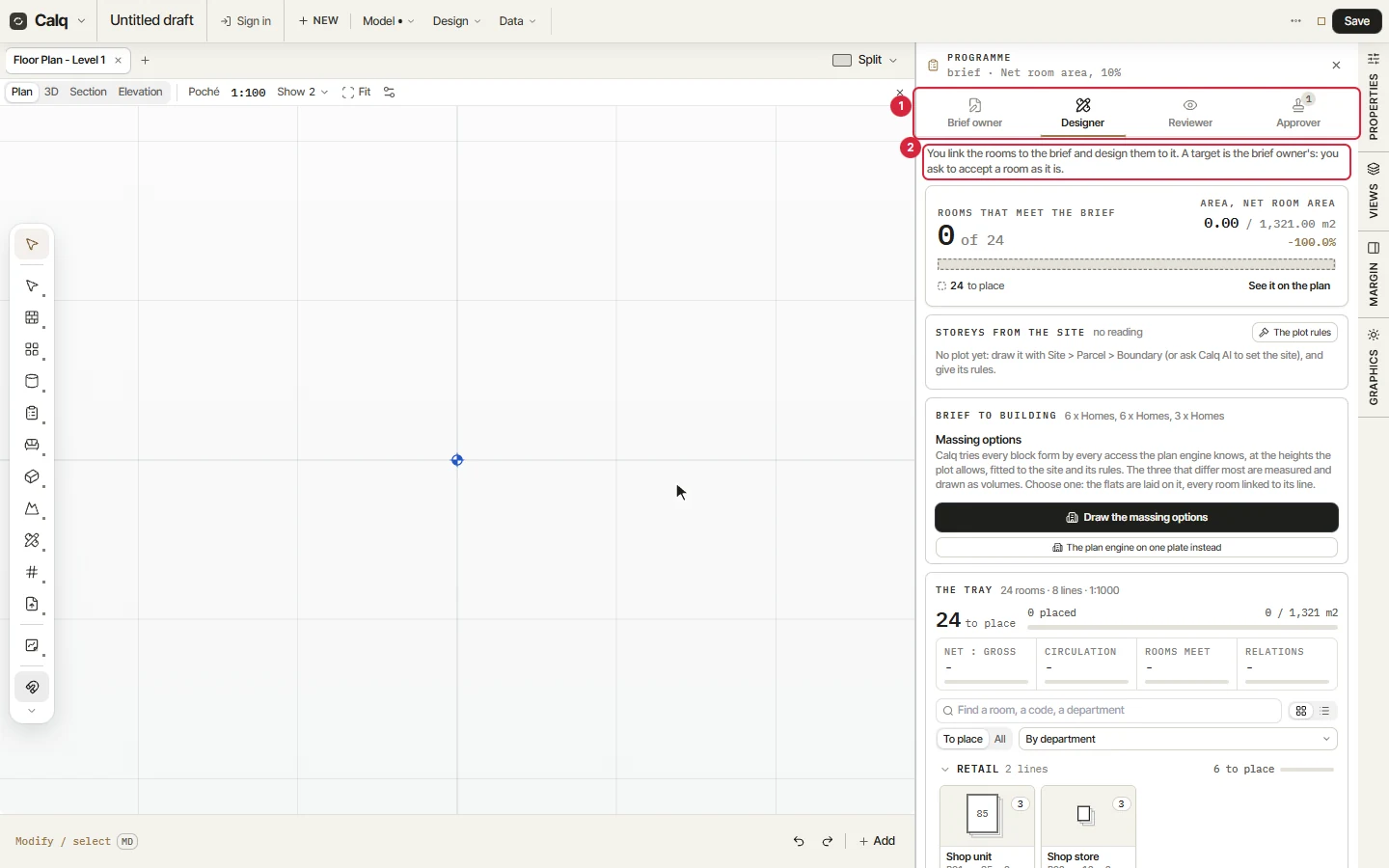
Open the Programme drawer from the Rooms toolset. As the owner you see the four roles as tabs (1), and may look at the brief as each one sees it; under them (2), one line says what that role does. Here the designer.
A person invited into the model sees no tabs: the drawer holds the one role they were given, said as given to them by the owner of the model.
03Invite someone
On a saved model, Share holds People on this model, the one card where people are managed (the Programme drawer shows the same card to the owner). Type an address, pick a role and press Invite:
- Calq emails an invitation that works once, and only for that address.
- They sign in with that address, or make a free account with it.
- They open the model in their role. An invited person never pays to join.
From the card the owner changes a role, sends an invitation again (the old link stops working), withdraws it, or takes someone off the model: their access ends at once. How many people a model may hold depends on the owner's plan, on calq.live/pricing. Copy link copies the model's address, which opens only for the people on it.
04The brief signed off from a link
The approver signs the brief off without a Calq account. Under Sign-off in the Programme drawer, the brief owner asks an address: Calq emails a link that works once, for seven days, bound to the model, to that address and to the brief as it stood when it was asked.
The approver opens the link, asks for a code sent to that address, types it and signs or refuses. The sign-off is written into the model as the approver. Sign-off then says signed or refused, by whom and when, or changed since when the brief or what the model measures moved after it was signed: ask again to have it signed as it stands.